Real Estate Marketing Funnel: From Listing Interest to a Viewing
Connect property posts, listing pages, enquiries and agent handoff into a clear process for arranging and completing viewings.

A post about an apartment can attract views, clicks and questions in the comments. To understand whether it helps your agency, follow what happens next: did the person find the details, get an answer, arrange a meeting with the agent and attend the viewing?
A real estate marketing funnel connects these actions into a clear process. At each stage, the visitor has a question and the agency has a task: show the property, explain the details, clarify a requirement or arrange a meeting. When the next step is unclear, progress can stall even after a successful post.
We will follow that journey using one fictional property. At the end, you will find a workflow table and a checklist you can apply to your own listing.
The journey from a property post to a viewing
Start with five stages:
Listing materials → property post → page with details → enquiry and agent handoff → viewing arrangements.
Each stage has its own outcome. Photos introduce the property. A post helps an interested person discover it. The property page answers basic questions. A conversation addresses their specific situation. The agent arranges the next action.

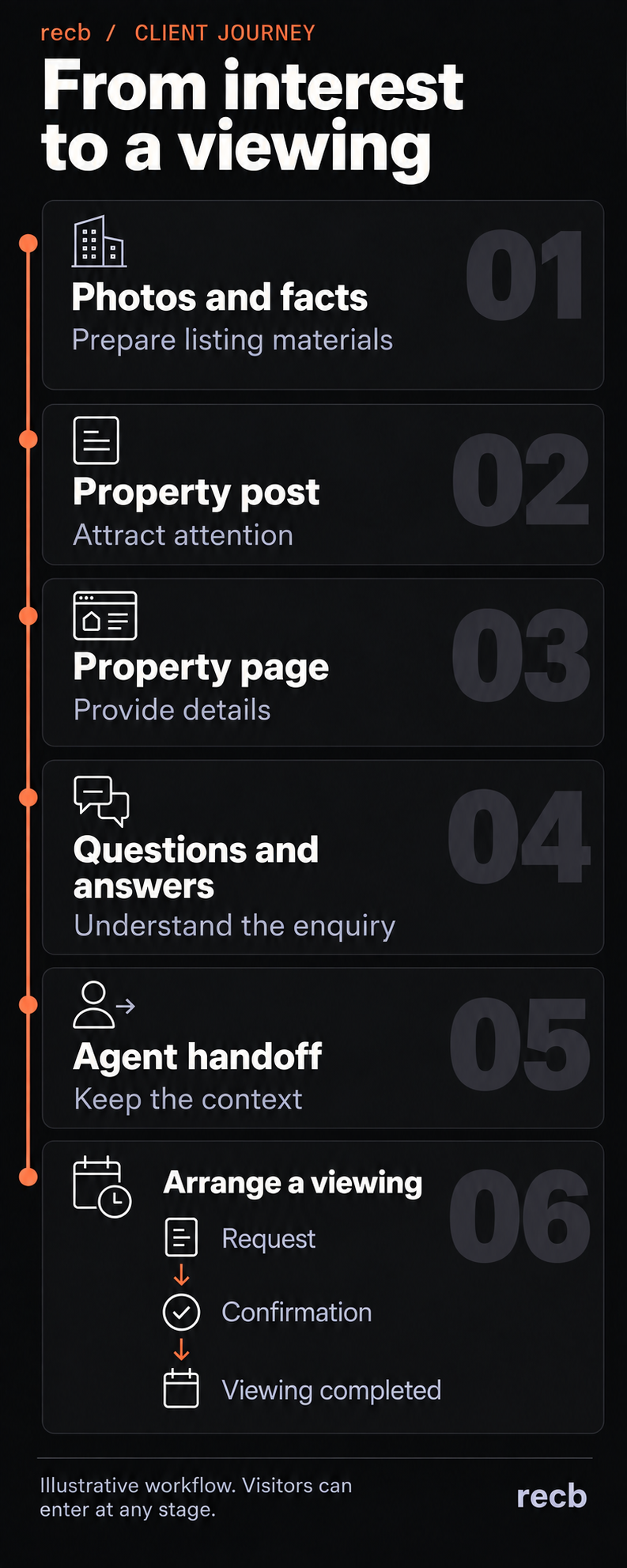
This is a map of the agency's work. A visitor can enter at any stage: find a property page through search, get in touch after a recommendation or call directly. They do not need to complete every intermediate step. What matters is that the team knows which questions have been answered and what needs to happen next.
One property, one story
Imagine Apartment A: two bedrooms, a separate kitchen and a balcony, on the fourth floor of a building with a lift. The agency has prepared photos and a floor plan. The owner's pet policy still needs checking, and viewing times must be arranged with the agent.
Apartment A, the visitor Marta and the conversation below are fictional. This is an illustrative workflow, not a client case study or evidence of any particular service's results.

Marta sees the apartment post. The layout works for her, but she has two questions: can she bring her cat, and could she view the apartment on Thursday evening? She wants to clarify these details first, so she prefers to send a message.
The agency's task is to help her get those answers, step by step. Here is what that requires.
1. Prepare materials you can use at every stage
Start with one property fact sheet. Use it as the source for the description, video, property page and replies to enquiries.
Separate the information into three groups:
- Confirmed: property features, the current price with its currency and payment period, known terms, photos and floor plan.
- Needs checking: questions the team cannot yet answer reliably.
- Subject to change: availability, price, terms and viewing access. Record who checked these details and when.
For Apartment A, the lift is a confirmed feature. Whether a cat is allowed remains an open question. Thursday evening is a visitor's preference; it does not create an available slot in the agent's schedule.
This distinction helps keep facts consistent across all materials. When terms change, the person responsible updates the fact sheet and checks the related posts and property page.
Photos should also support the specific message. If a post focuses on the layout, show the floor plan and relevant room photos. If the balcony is the focus, let the reader see it clearly. Label renderings and virtual staging so people understand what they are looking at.
2. Give the post a clear next step
A post should have one clear purpose. For example, it might introduce the layout and invite people to explore the apartment in more detail.
For our example, the copy could read:
Two bedrooms, a separate kitchen and a balcony. This fourth-floor apartment is in a building with a lift. Visit the property page for photos, the floor plan and full details. You can also ask a question or suggest a convenient viewing time.
Make that promise only if everything listed is available on the page. If the details or a way to ask a question are missing, prepare them first.
After following the link, Marta should recognise the same property by its photo, name and features. If the post leads to a general catalogue where she must find the apartment again, she has another task to complete before she can ask her original question.
You do not need a new page for every post. An existing listing page works if it contains the promised information and a working next step. Choose the route to that page based on the platform and post format.
3. Help visitors understand the property page
Look at the page through the eyes of someone who has never heard of your agency. They are trying to establish three things: whether the property suits them, what they still need to know and how to find out.
For Apartment A, the page should make it easy to find photos, the floor plan, key features, current terms and the responsible agent's contact details. Place explanations beside the information they clarify. For example, show the currency, payment period and known additional costs alongside the price.
Next steps can reflect different levels of readiness:
- “Ask about this property” for someone who needs clarification.
- “Request a viewing” for someone who wants to arrange a visit.
- The agent's contact details for someone who prefers to get in touch directly.
A button's label should match what happens after it is clicked. If the agent still needs to check the time, the visitor is submitting a viewing request. The success message should explain who will respond and what remains to be agreed.
In our example, Marta has already found the floor plan and the lift information. She still needs to ask about her cat and Thursday. A good transition preserves that context: the enquiry identifies which apartment she is asking about.
4. Answer the question and prepare the agent handoff
The first reply should move the visitor's original question forward. This applies whether a person or an automated assistant is responding.
Here is one way our illustrative conversation could continue:
Marta: Is a cat allowed? And could I view the apartment on Thursday after 6 pm?
Assistant: The agent needs to check the pet policy with the owner and arrange a viewing time. Would you like me to pass on both questions about Apartment A?
Marta: Yes. I'm looking to move next month. Email would be best.
Assistant: Please provide the email address where the agent can reply. I'll pass on that you're considering a move next month and would like to view the apartment on Thursday after 6 pm. The appointment is not confirmed yet.
The conversation leaves unknown details open and explains what happens next. Once the email address has been provided, the agent can receive a short summary:
| Field | What the enquiry tells us |
|---|---|
| Property | Apartment A |
| Visitor's question | Whether a cat is allowed |
| Preferred move-in timing | Next month |
| Viewing preference | Thursday after 6 pm; confirm the exact date and availability |
| Preferred contact channel | Email; add the address to the enquiry record once received |
| Unknown | Pet policy, available viewing time and the visitor's budget |
| Next step | Check the terms with the owner and offer an available viewing time |
| Responsible person | The assigned agent for the property |
Copy this template and adapt it to your process. Include facts from the conversation and clearly marked gaps. If the visitor has not stated a budget, do not infer one from the apartment they selected.
The enquiry is now ready to continue: the agent knows the property of interest, the unresolved issue and the reply the visitor expects. The agent still needs to check the terms and arrange the meeting.
5. Arrange the viewing and record the outcome
Separate at least three events: a viewing was requested, the appointment was confirmed, and the viewing took place. Each has different completion criteria and different reasons why progress might stop.
After the conversation in our example, there is a request for Thursday after 6 pm. Confirmation comes when the agent has checked viewing access and agreed a specific date, time and meeting point with Marta. If the participants are in different time zones, make the time unambiguous.
The confirmation should bring together everything needed for the meeting: the property, date, time, meeting point, agent's contact details and a way to request a change.
After the scheduled time, the agent records the outcome: completed, cancelled, rescheduled or no-show. A rescheduled appointment should retain the history of the original arrangement and record the new one. Finish the record with a clear next action: get feedback, answer a remaining question or suggest another property.
The journey can also end earlier. If the owner does not allow pets, the apartment does not meet Marta's stated requirement. Clarifying this revealed the mismatch before a visit. Any alternative should take her preferences into account.
What to measure at each stage
Before setting up reports, agree on what each event means. Opening a chat window does not mean someone has asked a question. Clicking a viewing button does not mean a request has reached the agent.
Start with a table like this:
| Stage | Visitor action | What to record | Responsible person | Next step |
|---|---|---|---|---|
| Property post | Opens the details | Traffic source and property, where identifiable | Person managing promotion | Deliver the promised information |
| Property page | Explores the property | Page visit; record a submitted question separately | Website and content owner | Provide a way to get in touch |
| Enquiry | Asks a question | Property, question, time received and time of a substantive reply | Agent or enquiry handling team | Answer or assign a follow-up |
| Agent handoff | Shares relevant details | Context, open questions, responsible agent and next-action deadline | Assigned agent | Continue the conversation |
| Viewing request | Suggests a time | Preference and arrangement status | Property agent | Check and agree a time |
| Confirmation | Agrees to the appointment | Agreed details and subsequent changes | Property agent | Conduct the viewing |
| Outcome | Attends, cancels or reschedules | Actual outcome and next action | Property agent | Follow up on the result |
In a small team, one person may fill several roles. What matters is that every open enquiry has a named person responsible for it.
You can use UTM parameters in campaign links to identify traffic sources. With Google Analytics configured, these distinguish sources, channels and campaigns. Agree on naming conventions in advance so different spellings do not split one campaign across several entries. How Google Analytics handles campaign parameters.
Connecting a visit to an enquiry and a completed viewing requires additional tracking. If the source is unknown, leave it unknown. Someone may return through another route or contact the agent directly.
To assess progress between stages, follow the same group of enquiries. For example, take viewing requests received during a particular week and check how many were subsequently confirmed and how many viewings took place. Show requests still being arranged separately. Dividing all viewings this week by all new enquiries this week can mix different groups of clients.
If you use a GA4 funnel report, check its entry rules and step sequence. A closed funnel counts users who enter at the first step; an open funnel allows entry at later steps. That choice changes which journeys appear in the report. GA4 funnel exploration documentation.
How to find the part worth improving
Start with an observable break in the process and review a few real enquiries. A drop in the number of people between stages does not explain its cause on its own.
People click through, but few ask questions. Check whether the page delivers what the post promised, whether details are easy to find and whether the form works on a phone. Then look at the traffic: interest in a photo does not necessarily mean interest in the property's terms. Some visitors may find enough information to decide the property does not suit them.
Questions repeat, and conversations stop. Check whether the first reply answers the person's question. Information that the team repeatedly explains by hand may belong on the page, provided it is confirmed and useful to other visitors.
The enquiry reaches an agent, but nothing happens next. Check the assigned person, the summary and the next-action deadline. The record should make it clear who is handling the question now.
Viewings are requested but never confirmed. Find out whose action is holding up the arrangement: the owner, the agent or the visitor. Check whether the form's success message makes it sound as though an appointment has already been booked.
Confirmed viewings do not take place. Review cancellations and rescheduling, the clarity of the arrangements and how easily the visitor can reach the agent. Gather evidence before deciding what to change.
How to adapt the workflow for a property developer
For a developer's sales team, define what the visitor is interested in: a development, a building, a floor plan type or a specific apartment. Preserve that context from the post through to the enquiry.
If someone came to explore a particular floor plan, pass that plan and their questions to the sales representative. Clearly distinguish images of completed properties from renderings of a future development. Check the availability and terms of the specific offering before confirming an answer.
The final event might be a sales office appointment, a showroom visit or an apartment viewing. Choose the relevant event type and track its request, confirmation and outcome separately. If your team uses several meeting formats, avoid combining them into one measure without explaining what it includes.
Where to start in your agency
Choose one current property and open its post on your phone. Follow the visitor's journey through to an enquiry. Tell the team in advance that this is a test so it is not mistaken for a client request.
Work through these questions:
- Does the post make it clear which property is being offered and where to find details?
- Does the right page open, and does its information match the post?
- Can a visitor ask a specific question and receive an answer or a clear explanation of how it will be checked?
- Does the agent receive the property, the question and any preferences already shared?
- Can both the visitor and the agent tell whether the appointment is still being arranged or has been confirmed?
- Is there somewhere for the responsible person to record the viewing's outcome and next action?
Turn the first break you find into a task: what happened, what should have happened, who will fix it and how to check the result. After the change, follow the same path again. This gives your team a tested process for one property that it can apply to other listings.